How to Build IT Equipment Allocation That Scales: Architecture, Docker, and Smart Matching
Every growing company hits the same wall: someone needs a laptop, a monitor, a dock, and accessories today, and nobody is fully sure what is in the closet, who returned what, or whether the best unit went to the right person.

Every growing company hits the same wall: someone needs a laptop, a monitor, a dock, and accessories today, and nobody is fully sure what is in the closet, who returned what, or whether the best unit went to the right person.
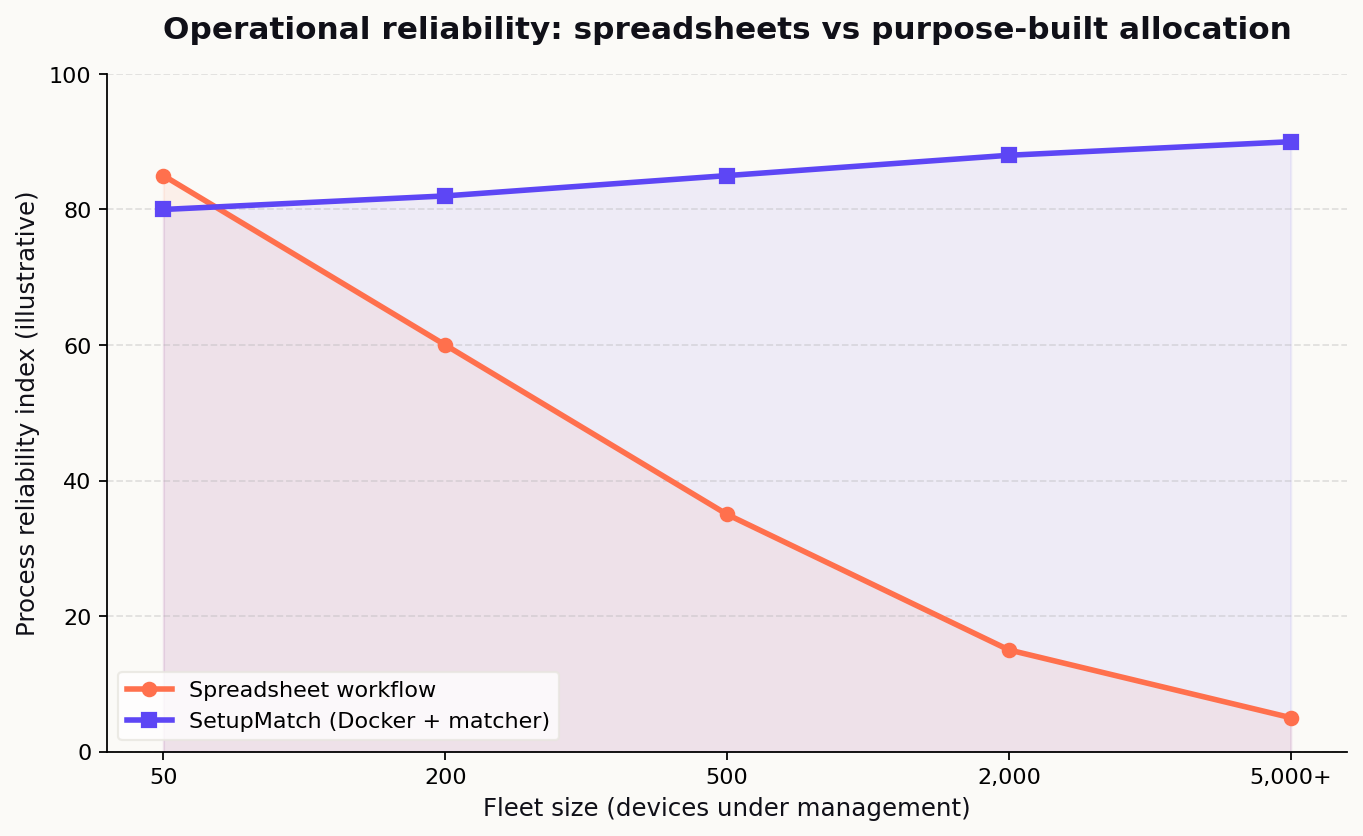
Spreadsheets work until they do not. At 50 employees you can wing it. At 500, assignments drift, high-spec machines sit idle, and onboarding becomes a chain of Slack messages instead of a repeatable process. Finance asks how many laptops are unassigned. Security asks who still has a device from a departed employee. HR asks why a new hire started without a monitor. IT becomes the bottleneck because there is no single source of truth.
SetupMatch is open-source software built for exactly this problem: a single inventory registry, role-based kit policies, and global matching that assigns a complete hardware kit from available stock. The application ships as a Docker Compose stack you can run on-premise behind your firewall, or you can use the managed SetupMatch Cloud service.
This article is a technical walkthrough of how SetupMatch is implemented: the allocation engine, database design, Angular operator UI, Docker packaging, and the operational reasons IT departments choose on-premise deployment for device management systems.
Ready to see it in action? Explore the product at setupmatch.cloud or book a setup call via the contact page.
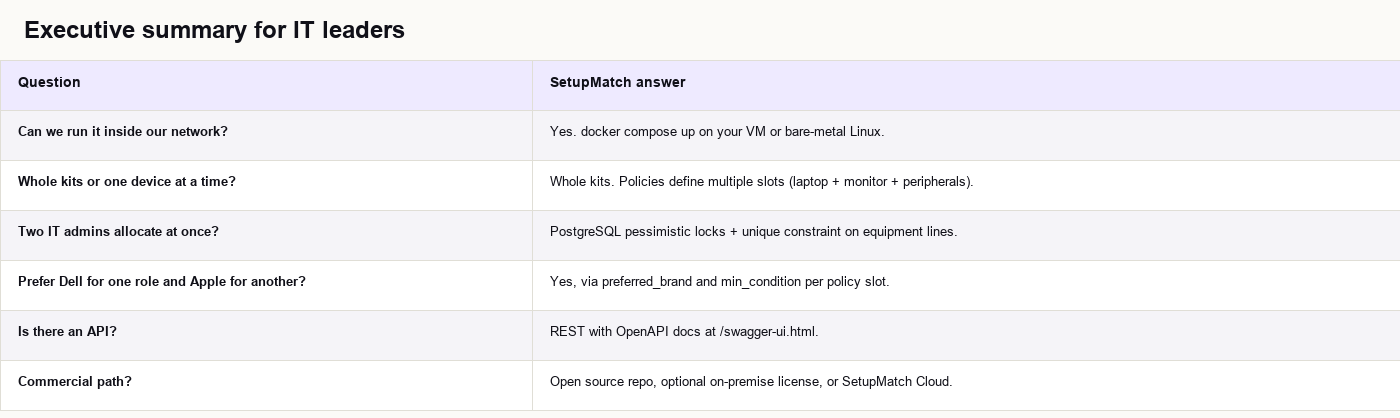
Executive summary for IT leaders
If you are evaluating device allocation software for your organization, here is what SetupMatch provides in one sentence: a transactional inventory system that matches full hardware kits to employees using global optimization, with explicit reservation before handoff, packaged for on-premise Docker deployment.
Talk to the team about cloud or on-premise →
The equipment assignment problem

IT departments managing hardware at scale face recurring pain points. These are not edge cases. They show up in every company that grows past the "one IT person knows where everything is" phase.
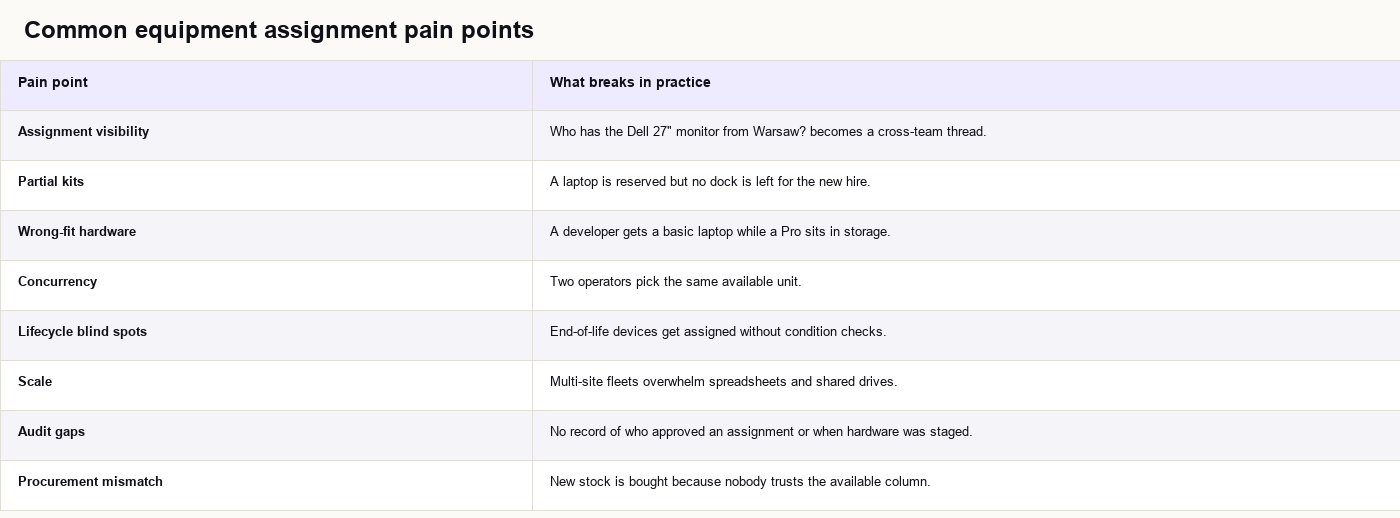
The core issue is not "tracking serial numbers." It is coordinating a multi-item kit assignment under constraints while keeping inventory state honest when plans change.
What "allocation" means in operations terms
In SetupMatch, allocation is a workflow with distinct phases:
- Register equipment into inventory (
available). - Define a policy describing the kit (one slot per required type, with optional brand and condition rules).
- Match against available stock using the Hungarian allocator.
- Reserve matched units (
reserved) until an operator confirms handoff. - Confirm (
assigned) or cancel (back toavailable).
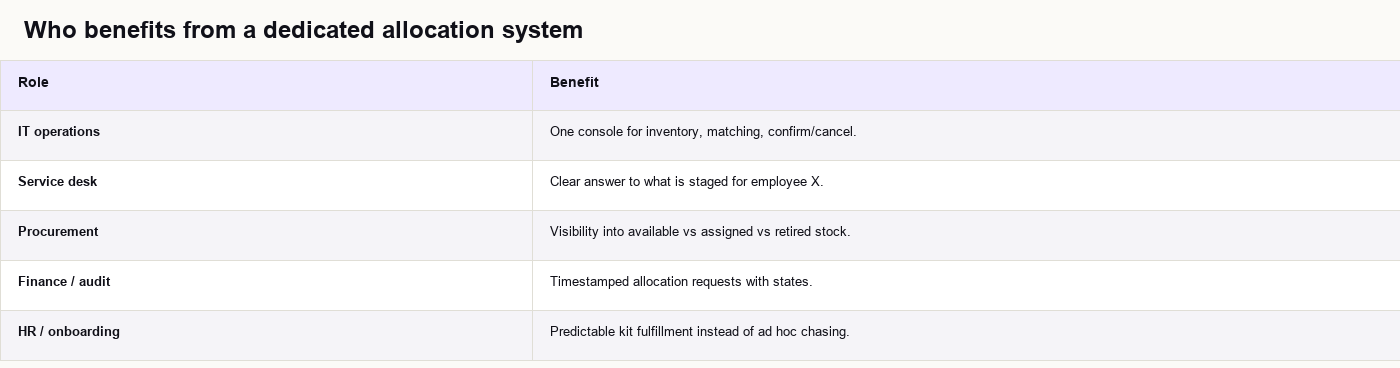
Who benefits from a dedicated system
Real-world scenarios where spreadsheets fail
Scenario 1: Two monitors, three candidates
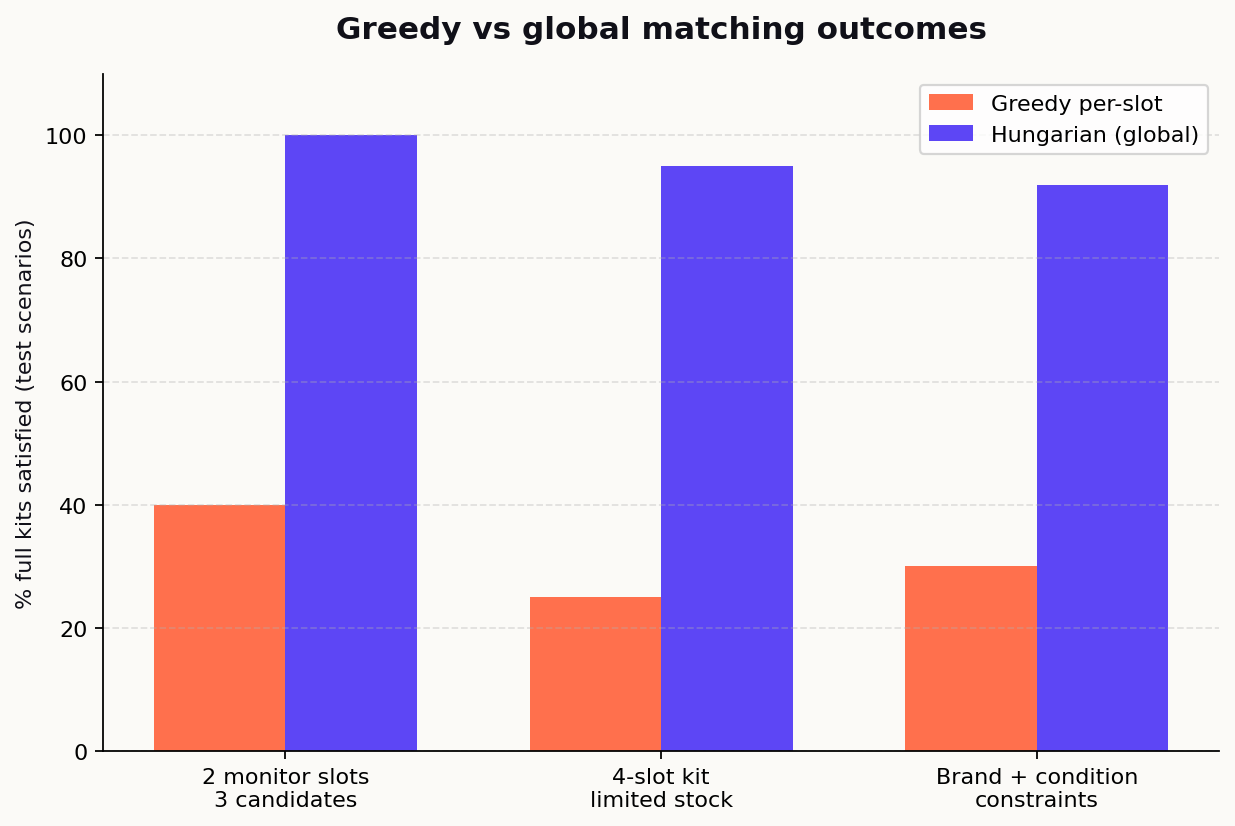
An employee needs two monitors. Stock has three units with different condition scores. A greedy approach assigns the highest-scoring monitor to slot 1, which can leave slot 2 unsatisfied even though a valid pairing exists across both slots.
SetupMatch's CompetingMonitorsTest encodes exactly this case: two monitor policy slots, three monitors, one slot with min_condition = 0.8. The Hungarian allocator assigns the high-condition unit to the constrained slot and a second distinct unit to the other slot. Both slots are satisfied.
Scenario 2: Concurrent onboarding week
Three new hires start Monday. Two IT admins work from the same spreadsheet. Both mark the same MacBook Pro as "assigned to Alex" without seeing each other's edit. One employee shows up without a laptop.
SetupMatch locks eligible rows with PESSIMISTIC_WRITE during allocation create, and the allocation_line table enforces UNIQUE (equipment_id) so one physical unit cannot appear in two active allocation lines.
Scenario 3: Developer stuck on the wrong machine
A senior engineer policy requires 16 GB RAM class hardware, but the spreadsheet only tracks "laptop" as a category. They receive a spare Air while a Pro sits in a closet labeled "unassigned."
SetupMatch policies carry per-slot min_condition and preferred_brand. Condition is a normalized 0.0–1.0 score in v1 (your team maps that to internal grading). The matcher treats minimum condition as a hard constraint, not a sort hint.
Scenario 4: Offboarding and returns
An employee leaves. Hardware comes back to the closet. In a spreadsheet, the row often stays linked to the departed employee until someone remembers to clear it.
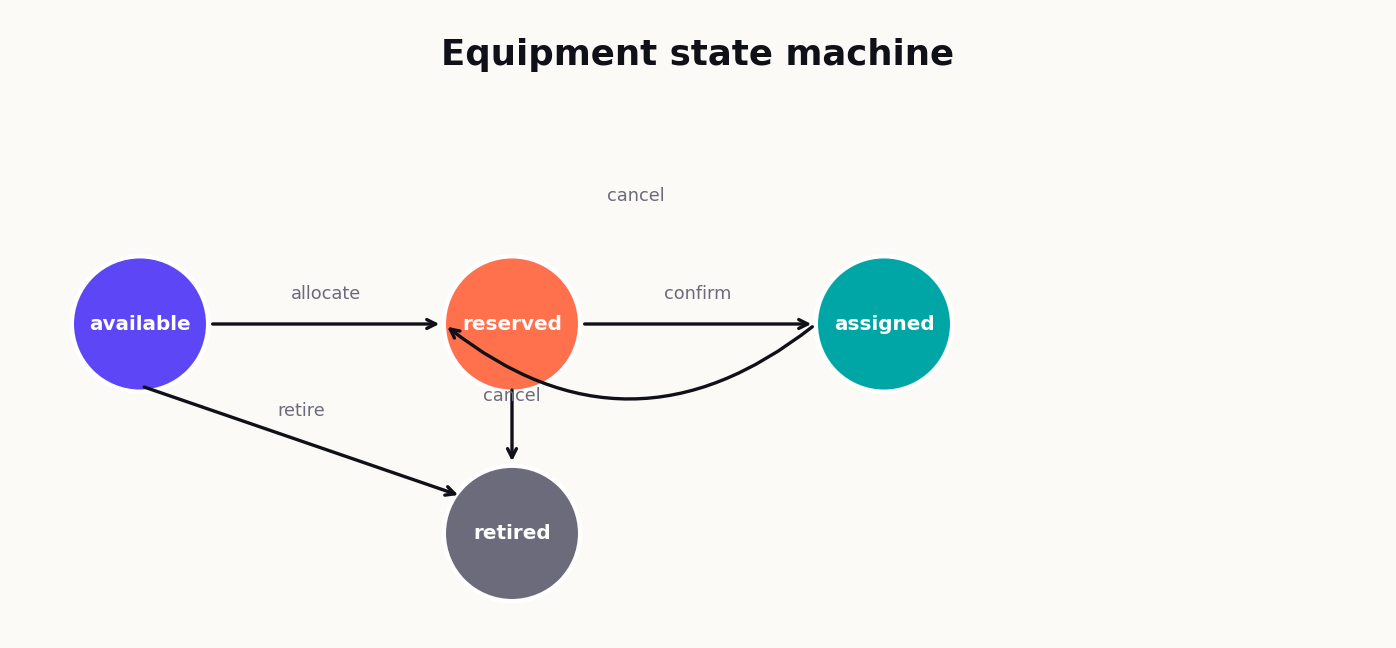
In SetupMatch, confirmed assignments keep equipment in assigned until you build a return flow (v1 focuses on forward allocation). Cancelled allocations explicitly release reserved units back to available, which is the common case when a start date slips.

What SetupMatch does differently
Most inventory tools stop at listing assets. SetupMatch adds capabilities that matter specifically for allocation:
1. Kit policies, not single-device picks
A new hire policy might require:
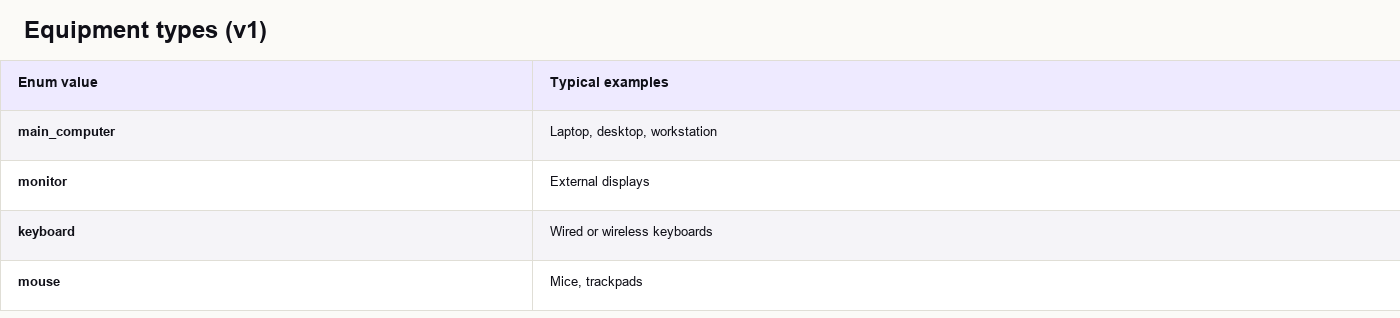
main_computermonitorkeyboardmouse
preferred_brand and min_condition. The API accepts policies as JSON arrays; PostgreSQL stores them in JSONB on allocation_request.policy, so you can evolve policy shape without a migration per template.
Example policy payload:
{
  "employee_id": "E-10482",
  "policy": [
    { "type": "main_computer", "min_condition": 0.75, "preferred_brand": "Apple" },
    { "type": "monitor", "min_condition": 0.8 },
    { "type": "keyboard" },
    { "type": "mouse" }
  ]
}
2. Global matching, not greedy per-slot picking
Picking the "best" laptop first can block a better overall kit. SetupMatch optimizes the entire policy at once within each equipment type using maximum-weight bipartite matching.
3. Explicit reservation step
Successful matches move equipment to reserved until an operator confirms or cancels. That mirrors physical staging and prevents silent double-booking.
4. Actionable failure reasons
When matching fails, the allocation request is stored with state = failed and a human-readable failure_reason, for example:
No available equipment of type monitorCannot satisfy minimum condition 0.8 for type monitor (no eligible units)Not enough distinct equipment to fulfill policy (need 2 monitor, found 1 eligible)
Learn how SetupMatch addresses fleet visibility and smart matching →
System architecture overview
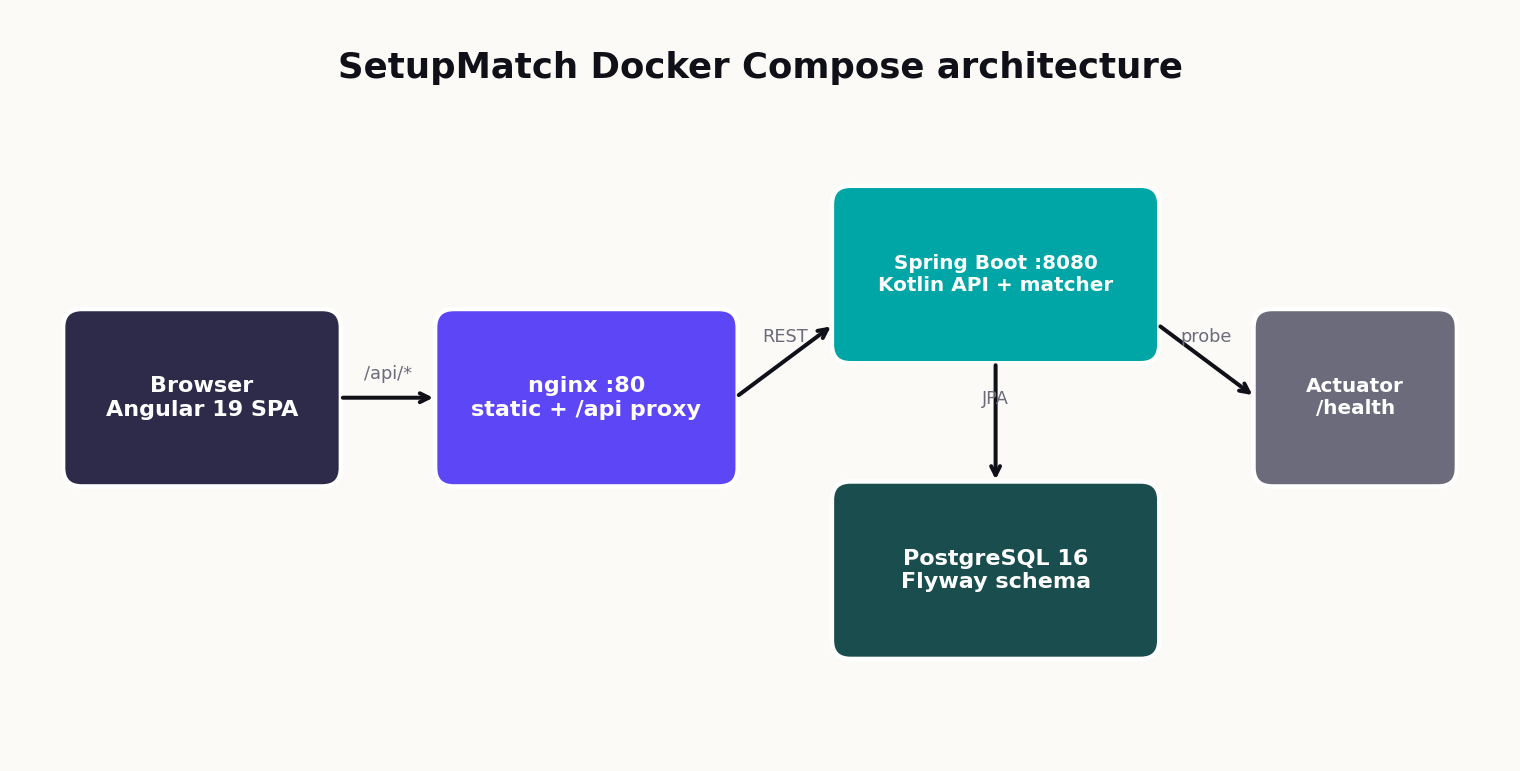
SetupMatch is a three-tier application packaged for Docker Compose: Angular frontend, Spring Boot API, and PostgreSQL. Nginx in the frontend container serves the SPA and reverse-proxies /api/* to the backend.
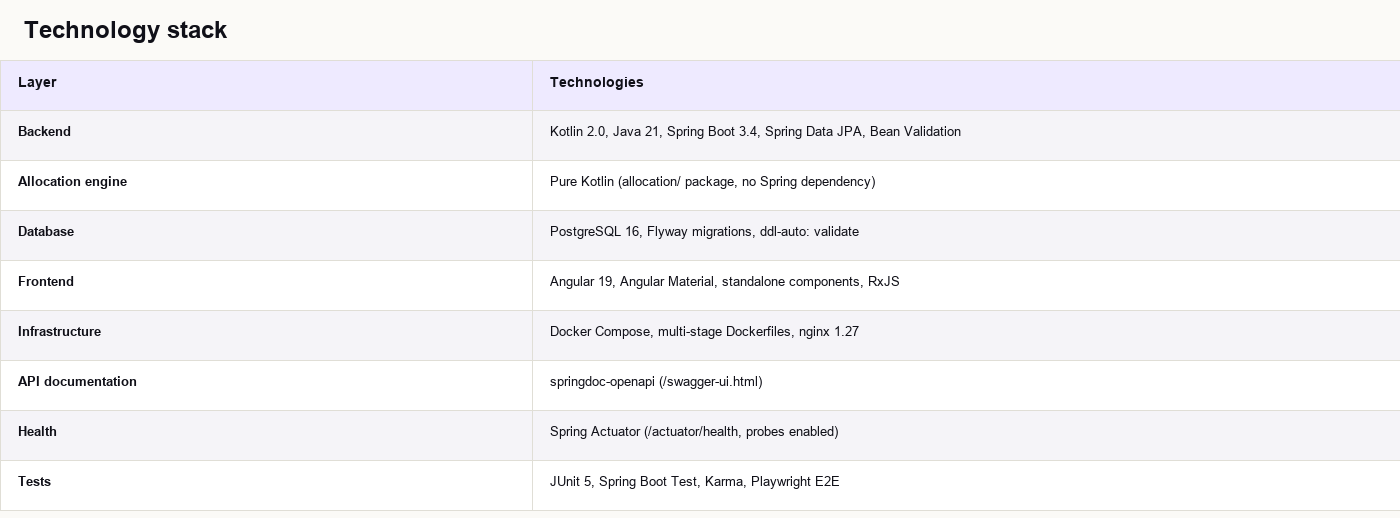
Technology stack
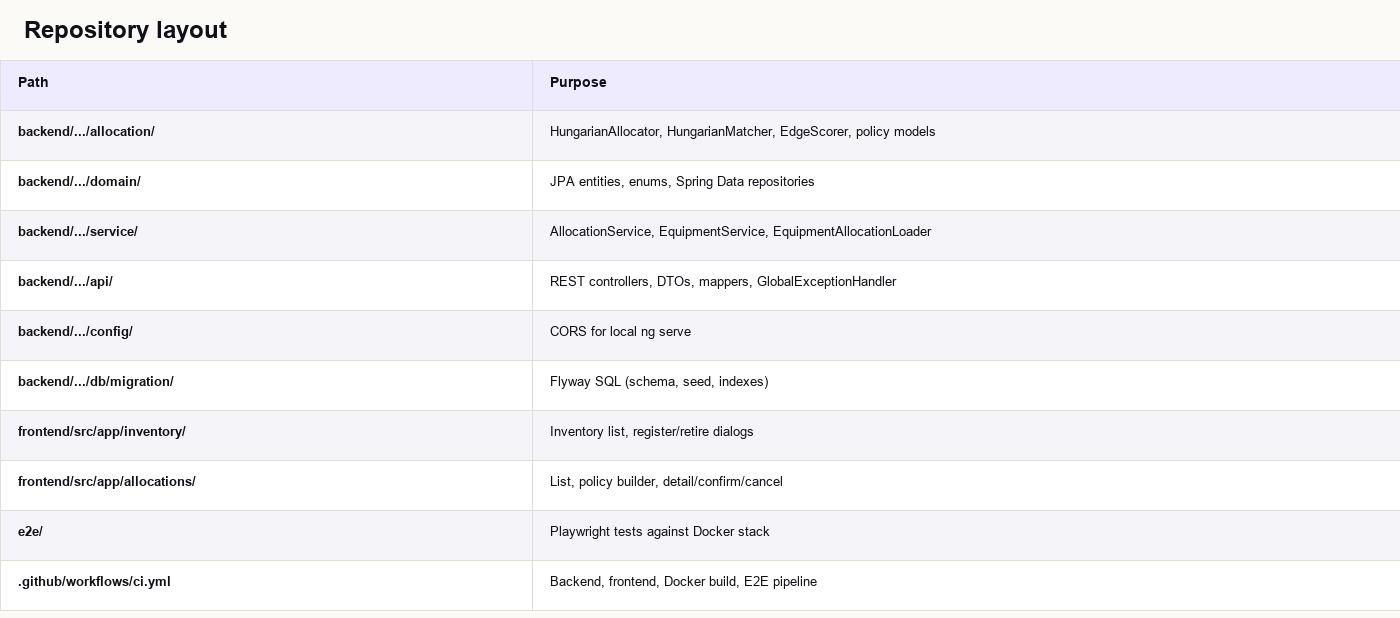
Repository layout
The marketing site lives in a separate repo (setupmatch-web) at setupmatch.cloud. This repository is the operational product IT teams deploy.
Request path in production
Browser  →  GET /inventory          →  nginx serves Angular bundle
Browser  →  POST /api/allocations   →  nginx proxy_pass → Spring Boot POST /allocations
Spring   →  JDBC                    →  PostgreSQL
Nginx configuration strips the /api prefix:
location /api/ {
    proxy_pass http://backend:8080/;
    proxy_http_version 1.1;
    proxy_set_header Host $host;
    proxy_set_header X-Real-IP $remote_addr;
    proxy_set_header X-Forwarded-For $proxy_add_x_forwarded_for;
    proxy_set_header X-Forwarded-Proto $scheme;
}
Angular uses try_files $uri $uri/ /index.html for client-side routing. Both environment.ts and environment.prod.ts set apiUrl: '/api', so the same relative path works in Docker and behind a corporate reverse proxy.
Backend: inventory truth and allocation engine
The backend follows a conventional Spring layering, with one important separation: the matcher is framework-agnostic. You can unit test allocation logic without spinning up Spring or a database.
Domain model
Equipment types (v1):
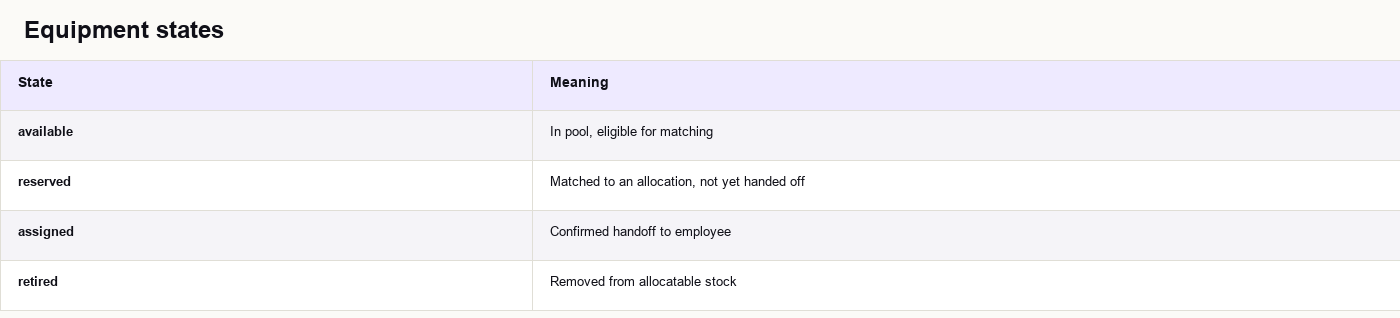
Equipment states:
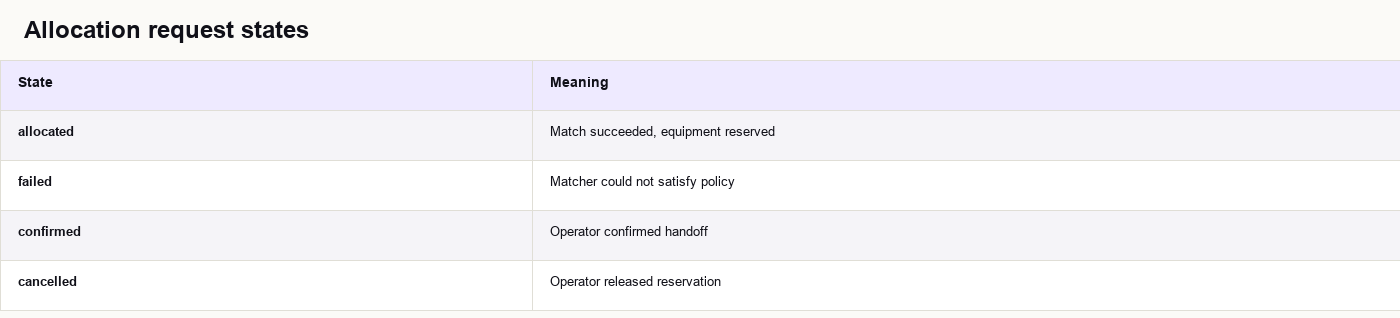
Allocation request states:
Equipment entity fields
Each equipment row includes:
id(UUID, primary key)type,brand,modelstatecondition_score(NUMERIC, 0.000–1.000, CHECK constrained)purchase_date(DATE)retire_reason,retired_at(nullable)created_at(TIMESTAMPTZ)
POST /equipments always creates available units. Retirement via POST /equipments/{id}/retire is only allowed from available. Reserved and assigned units must flow through allocation cancel/confirm semantics first.
REST API surface
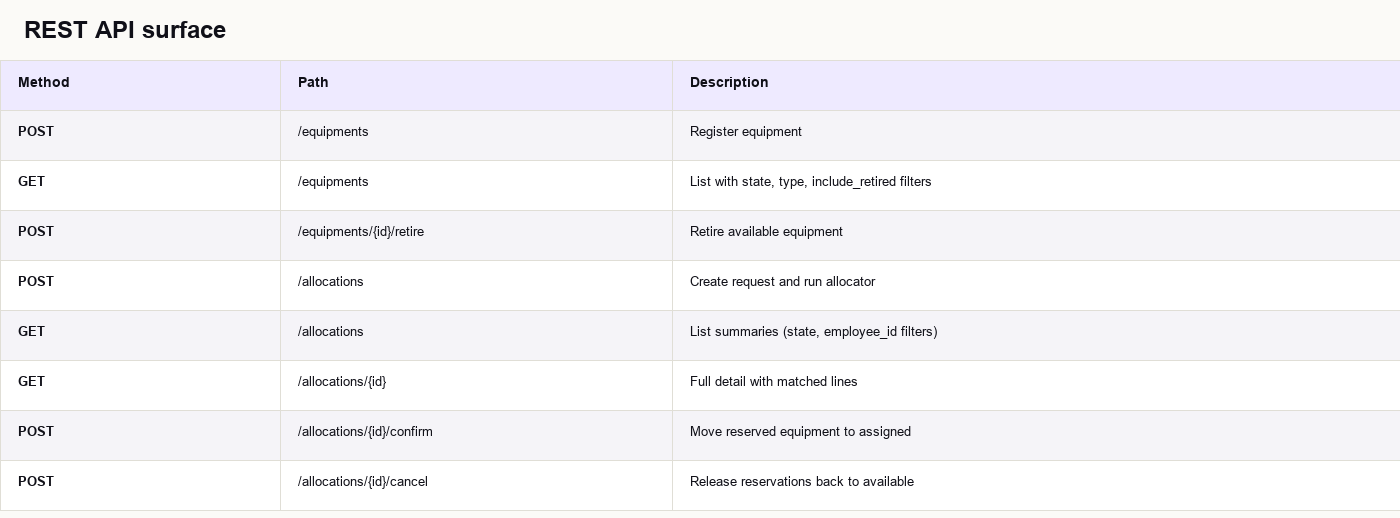
DTOs use Jackson PropertyNamingStrategies.SnakeCaseStrategy, so JSON fields are employee_id, min_condition, failure_reason, etc.
Error handling
GlobalExceptionHandler returns consistent JSON:
{
  "message": "Validation failed",
  "field_errors": {
    "employee_id": "must not be blank"
  }
}
HTTP status codes follow REST conventions: 404 for missing allocations, 409 CONFLICT when confirm/cancel is attempted in the wrong state.
Auth in v1
Authentication is intentionally omitted in v1 (single-operator demo). For production on-premise deployments, you would typically place the stack behind your SSO reverse proxy or add Spring Security in a later version. The Docker model still helps: you control network ingress and TLS termination.
The allocation create transaction
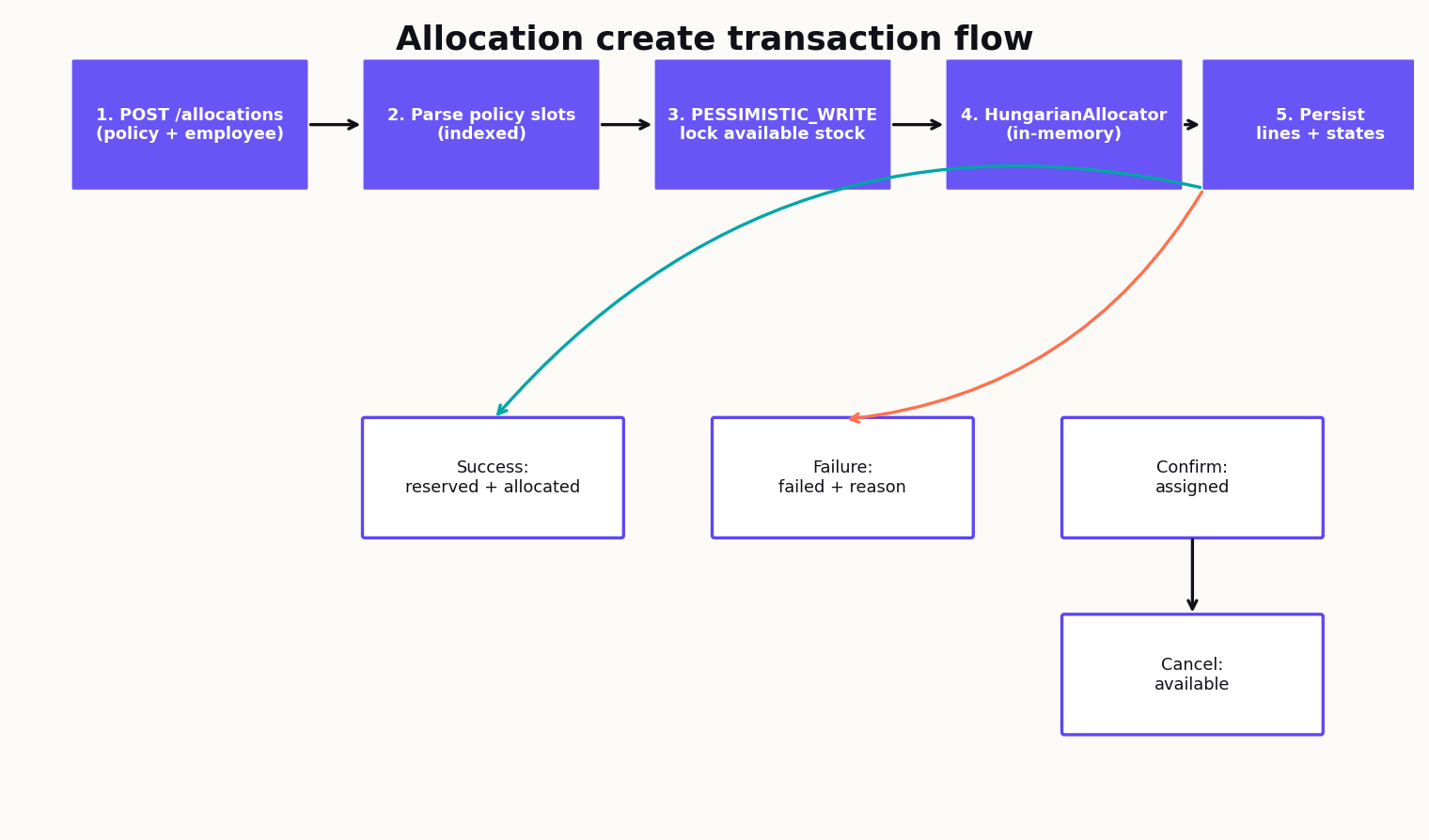
AllocationService.create runs inside a single @Transactional boundary. Here is the full logical flow:
Step-by-step
- Parse policy —
CreateAllocationRequest.policymaps to indexedPolicySlotobjects (0..n-1).
- Prefetch and lock —
EquipmentAllocationLoader.loadAndLockAvailable(): - Computes per-type minimum condition floors via
PolicySlotFilters.floorsByType(). - If any slot of a type has no floor, fetch all available units of that type.
- Otherwise fetch available units where
condition_score >= floor. - Applies
LockModeType.PESSIMISTIC_WRITEon matching rows. - Orders by
idfor deterministic behavior.
- Map to candidates — Locked entities become
EquipmentCandidatevalue objects (id, type, brand, model, condition, purchase date).
- Run matcher —
HungarianAllocator.allocate(policySlots, candidates)returnsSuccessorFailure.
- Persist outcome:
- Failure:
allocation_request.state = failed,failure_reasonset, no equipment mutation. - Success: each matched unit →
reserved,allocation_linerows created,state = allocated.
- Return detail — Reload with lines and map to
AllocationDetailResponse.
Confirm and cancel
Confirm (POST /allocations/{id}/confirm):
- Requires
state == allocated. - Every line's equipment must be
reserved. - Sets equipment →
assigned, request →confirmed.
POST /allocations/{id}/cancel):
- Requires
state == allocated. - Sets all line equipment →
available, request →cancelled.
updated_at and return the full detail DTO.
Global matching with the Hungarian algorithm
IT kit assignment is a bipartite matching problem: policy slots on one side, available units on the other, weighted edges describing pairing quality.
Why greedy matching fails
Consider a policy with two monitor slots and three monitors in stock. A greedy algorithm assigns the highest-scoring monitor to slot A first. That can leave slot B with no compatible unit even though a different pairing would satisfy both slots.
The Hungarian algorithm (Kuhn-Munkres) solves maximum-weight bipartite matching globally: it maximizes the sum of edge weights across the full assignment.
Implementation highlights
HungarianAllocator:
- Groups slots and candidates by
EquipmentType. - Runs
parallelStream()per type group (laptop slots never compete with monitor slots). - Builds a weight matrix per type group.
- Delegates to
HungarianMatcher.maxWeightAssignment().
HungarianMatcher:
- Converts max-weight to min-cost by negating weights.
- Uses rectangular optimization
O(rows² × cols)whenrows <= cols(typical: few policy slots, many candidates). - Pads to square when needed.
-1_000_000 via EdgeScorer.INCOMPATIBLE.
Worked example: competing monitors
Policy:

Candidates:

Slot 0 can only use A. Slot 1 takes B. Unit C is unused. Greedy might assign A to slot 1 (higher score) and then fail slot 0's hard constraint.
Edge scoring and policy constraints
Hard constraints
An edge is incompatible (weight = -1_000_000) when:
candidate.type != slot.typecandidate.condition_score < slot.min_conditionwhenmin_conditionis set
Soft scoring
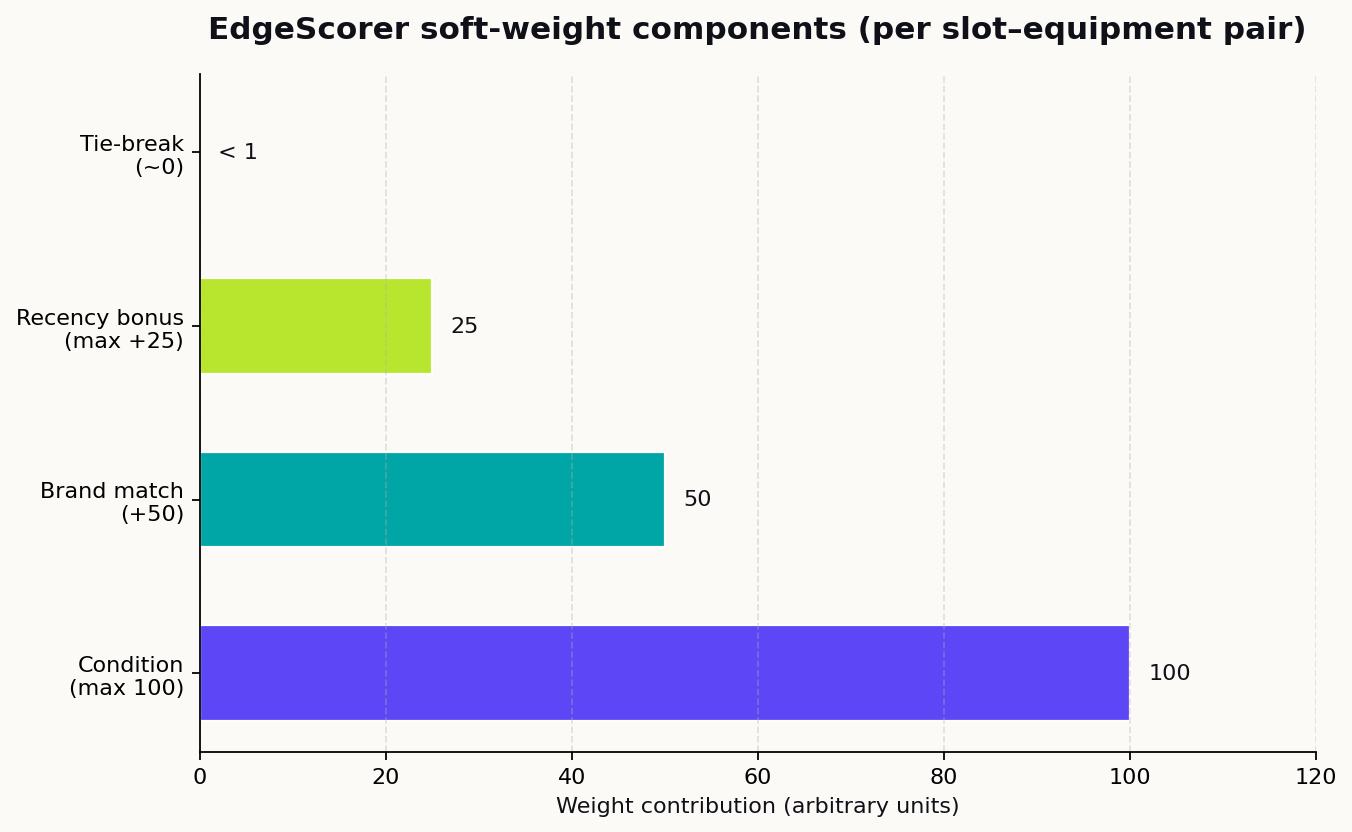
For compatible pairs, EdgeScorer.computeWeight() returns:
weight = (condition × 100) + brand_bonus + recency_bonus + tie_break
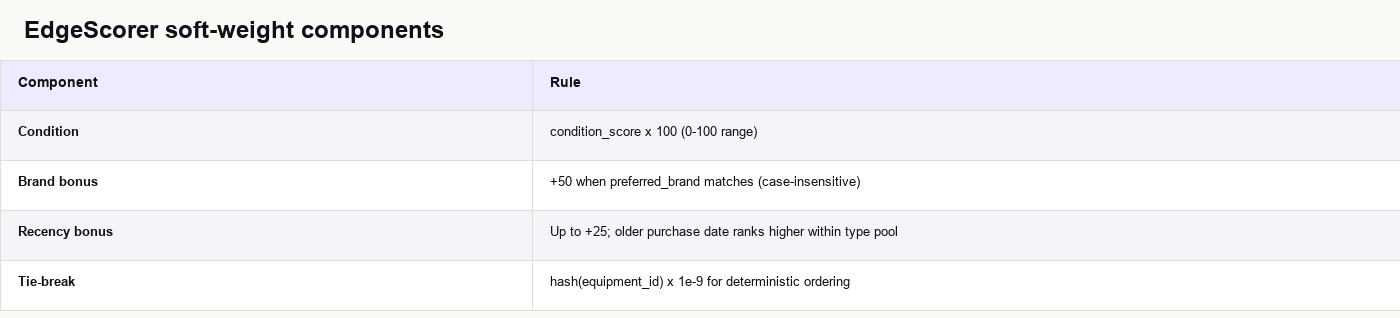
Recency ranks are computed per type: candidates sorted by purchase_date ascending, rank 0 = oldest.
Database prefetch optimization
PolicySlotFilters.floorsByType() computes the lowest min_condition per equipment type across all slots. The SQL loader uses:
state = available
AND (
  (type = main_computer AND condition >= floor_main) OR
  (type = monitor AND condition >= floor_monitor) OR
  ...
)
If any slot of a type has no min_condition, the floor for that type is null and all available units of that type are fetched. This avoids loading the entire inventory when policies are selective.
Equipment and allocation state machines
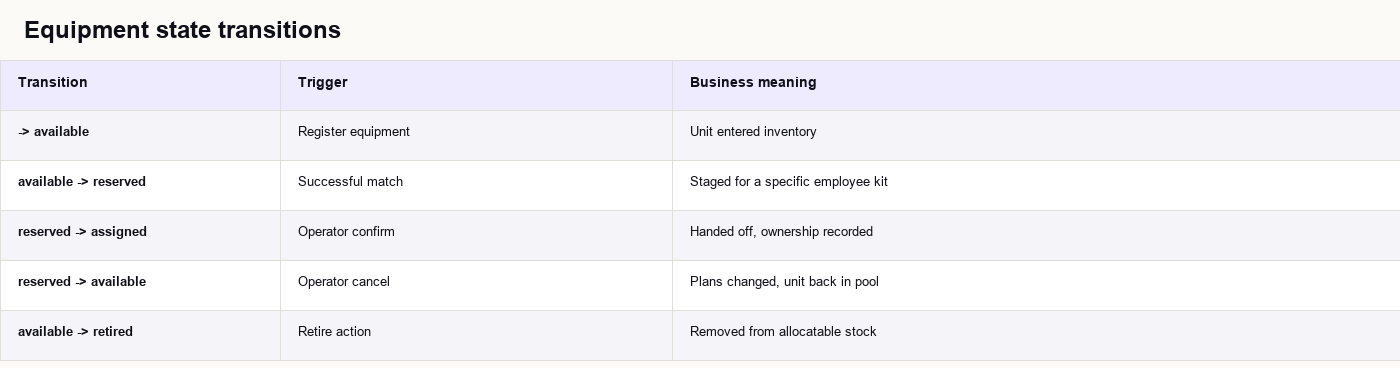
Clear state machines make allocation trustworthy for auditors and service desk teams.
Equipment lifecycle
Allocation request lifecycle
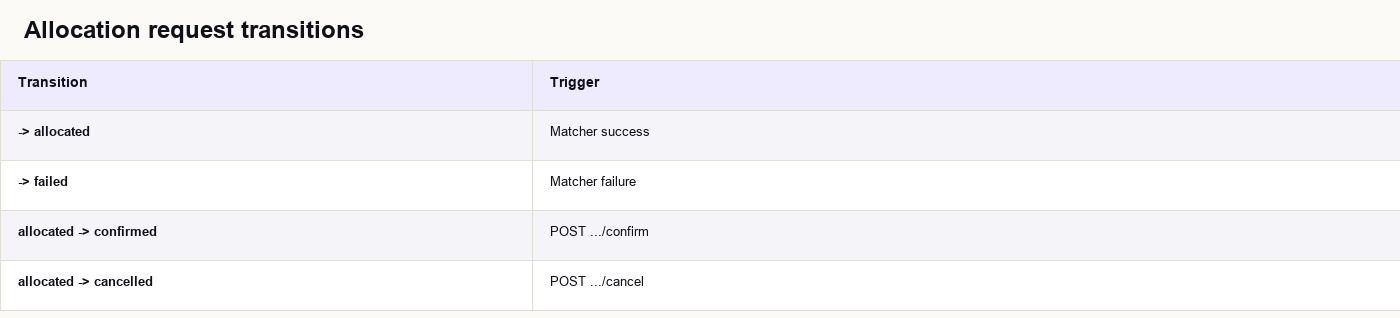
Failed allocations remain in the database as auditable records. They are not deleted.
Frontend: ops UI for IT teams
The Angular app is an operator console for IT staff, not an employee self-service portal in v1.
Routes
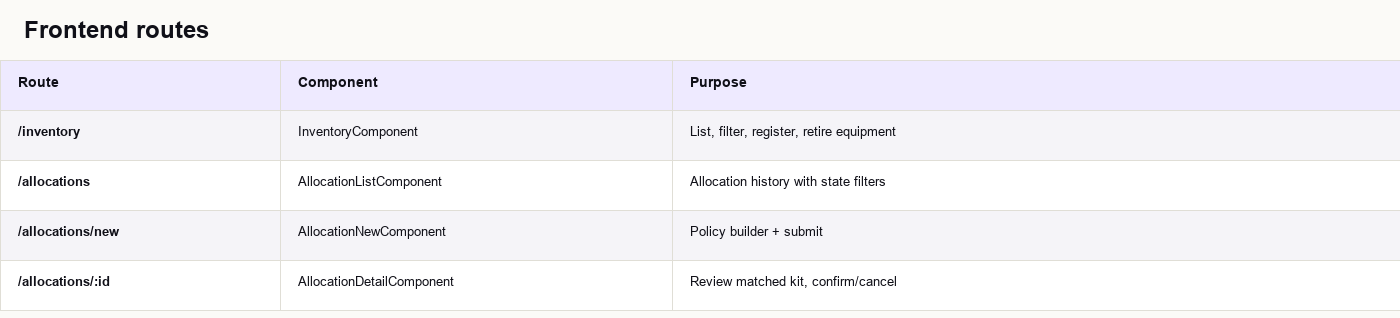
All routes nest under ShellComponent with header navigation (Inventory / Allocations).
Policy builder UX
AllocationNewComponent uses:
- Reactive forms with a dynamic
FormArrayfor policy slots. ConditionScoreFieldComponentfor 0–1 condition input on slots.- Employee ID autocomplete from demo employee list (replace with HR integration in production).
buildBrandOptionsByType()to suggest brands already present in inventory.- Route and slot animations (
fade.animations.ts) for polish.
AllocationApiService.create()posts to/api/allocations.- On success, navigates to detail view.
- On validation error,
ErrorBannerComponentshowsfield_errorsfrom API. EquipmentRefreshServicenotifies inventory when confirm/cancel changes stock.
API services
// environment.ts / environment.prod.ts
apiUrl: '/api'

// AllocationApiService
create(request)  → POST /api/allocations
confirm(id)      → POST /api/allocations/{id}/confirm
cancel(id)       → POST /api/allocations/{id}/cancel
provideHttpClient(withFetch()) is enabled in app.config.ts for SSR-friendly HTTP in Angular 19.
Local development without Docker
Run backend on :8080, frontend with ng serve on :4200. WebConfig.kt enables CORS for http://localhost:4200. Configure a dev proxy or run the full Docker stack so /api resolves consistently.
Database design, indexes, and performance
Flyway owns the schema. Hibernate validates entities against migrations (ddl-auto: validate). No auto-DDL in production.
Core tables (V1)
equipment
CREATE TABLE equipment (
    id UUID PRIMARY KEY,
    type VARCHAR(32) NOT NULL,
    brand VARCHAR(128) NOT NULL,
    model VARCHAR(128) NOT NULL,
    state VARCHAR(32) NOT NULL,
    condition_score NUMERIC(4, 3) NOT NULL,
    purchase_date DATE NOT NULL,
    retire_reason TEXT,
    retired_at TIMESTAMPTZ,
    created_at TIMESTAMPTZ NOT NULL DEFAULT NOW(),
    CONSTRAINT chk_equipment_condition CHECK (condition_score >= 0 AND condition_score <= 1)
);
allocation_request — policy JSONB NOT NULL stores the slot array.
allocation_line — UNIQUE (equipment_id) prevents double-booking at the database level.
Index evolution
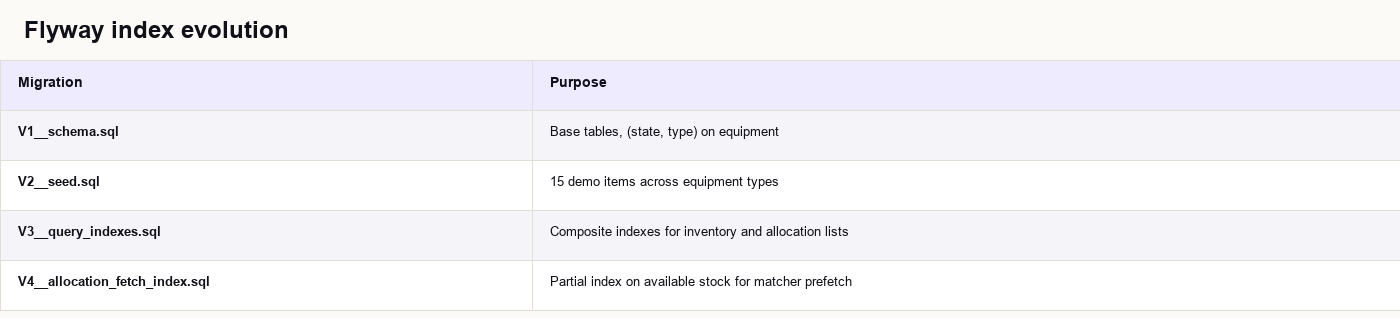
Critical partial index:
CREATE INDEX idx_equipment_available_type_condition_id
    ON equipment (type, condition_score, id)
    WHERE state = 'available';
This supports the locked criteria query ordered by id under load.
Performance testing
AllocationPerformanceIT benchmarks allocator and full-stack allocation with large synthetic inventories (thousands of rows). The rectangular Hungarian implementation targets the common case: few policy slots, many candidates, which is typical for enterprise kit policies.
Why Docker is a strong fit for on-premise IT

Many IT departments evaluating device allocation software cannot send inventory data to a public SaaS: procurement rules, union agreements, GDPR, sector regulations, or internal policy that asset data never leaves the building.
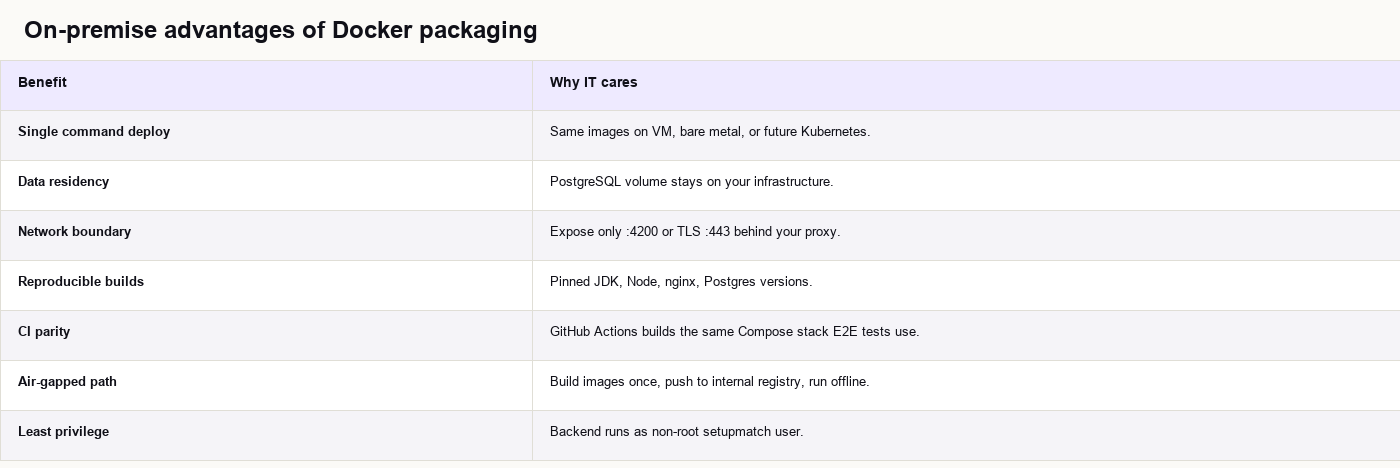
Docker Compose gives SetupMatch a repeatable on-premise footprint without hiring a platform team.
Health-gated startup
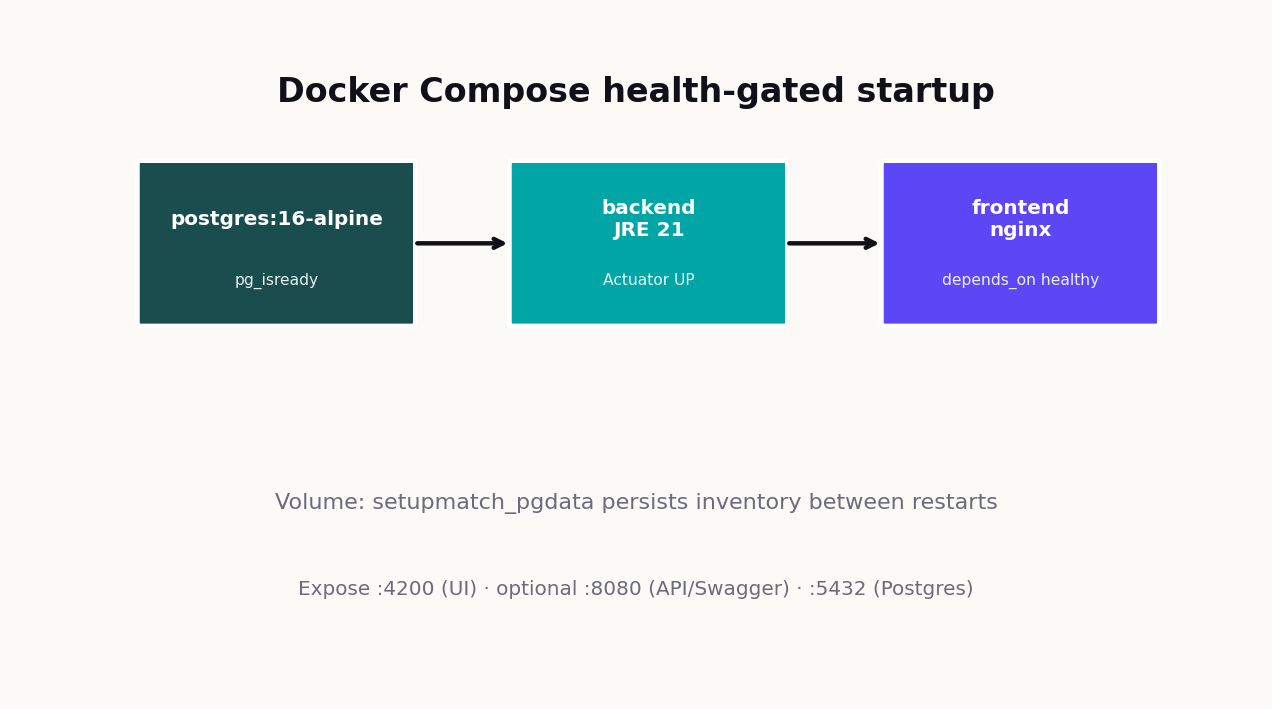
docker compose up --build starts:

Postgres data persists in named volume setupmatch_pgdata.
On-premise advantages
Backend Dockerfile (multi-stage)
FROM eclipse-temurin:21-jdk-alpine AS build

FROM eclipse-temurin:21-jre-alpine
RUN apk add --no-cache wget
RUN addgroup -S setupmatch && adduser -S setupmatch -G setupmatch
USER setupmatch
COPY --from=build /app/build/libs/*.jar app.jar
ENTRYPOINT ["java", "-jar", "app.jar"]
Frontend Dockerfile (multi-stage)
Node 22 builds the Angular production bundle. nginx Alpine serves static files and proxies API traffic. No Node runtime in the production image.
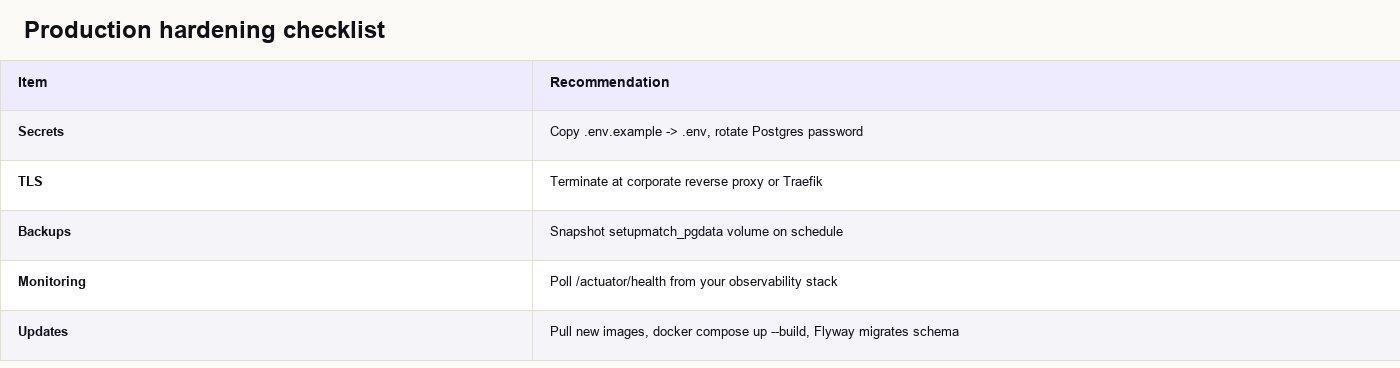
Production hardening checklist
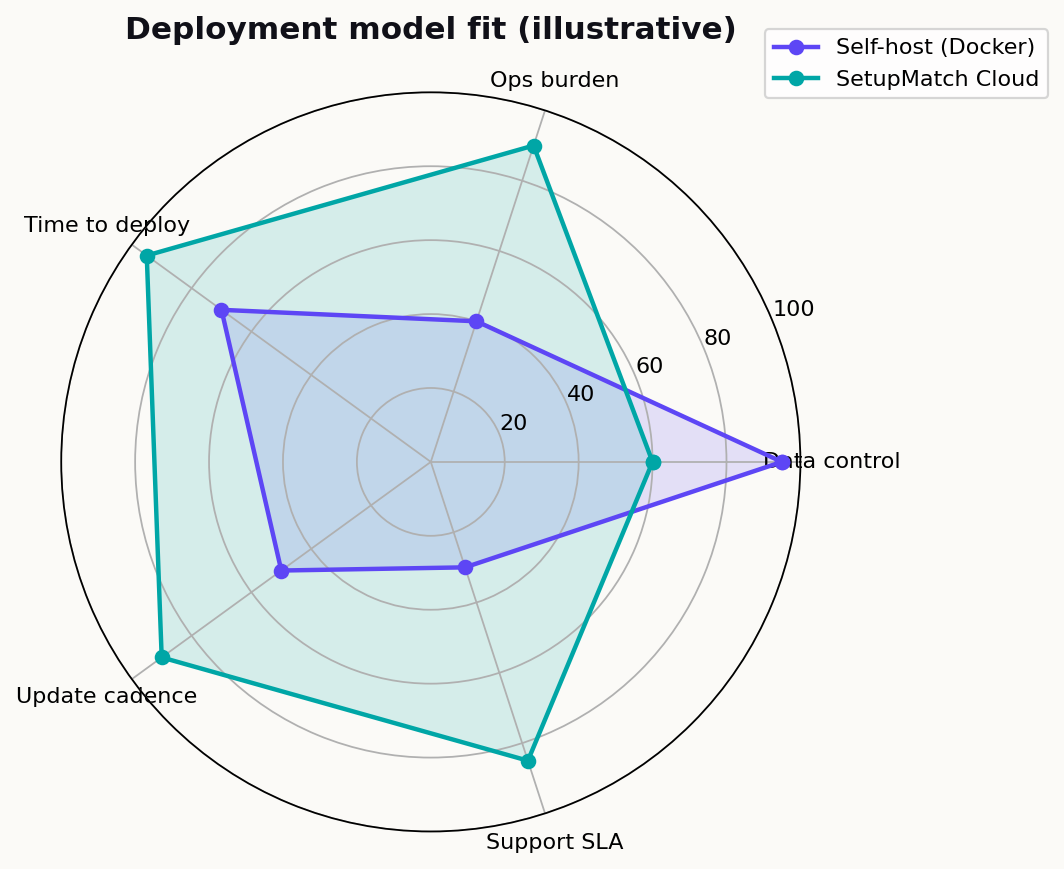
When cloud still makes sense
SetupMatch Cloud is the fully managed option: no VM patching, automatic updates, support for teams that prefer SaaS operations.
Contact us about on-premise licensing or cloud hosting →
CI/CD and quality gates
.github/workflows/ci.yml runs four jobs on every push/PR to main:
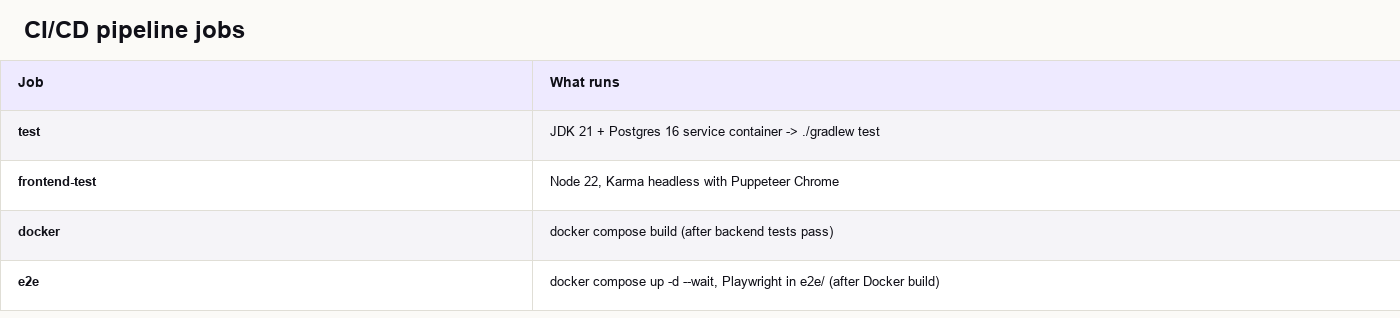
E2E always tears down with docker compose down -v so CI does not leak volumes.
Test coverage highlights
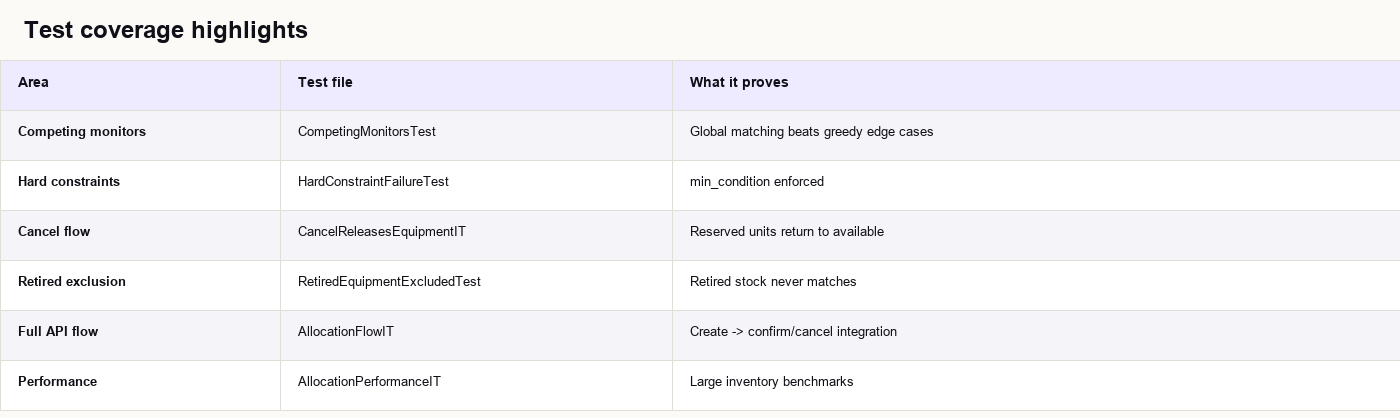
This pipeline matters for on-premise buyers: the same Compose file you run in CI is what you run in production.
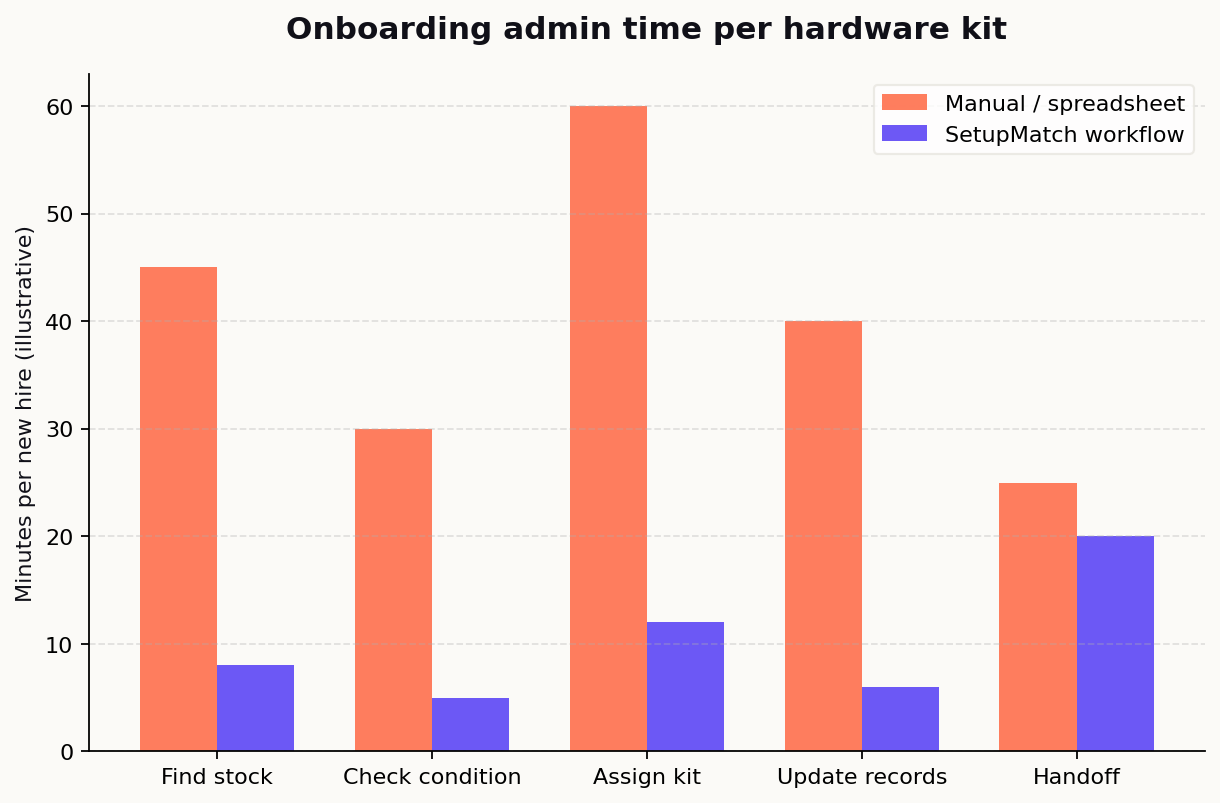
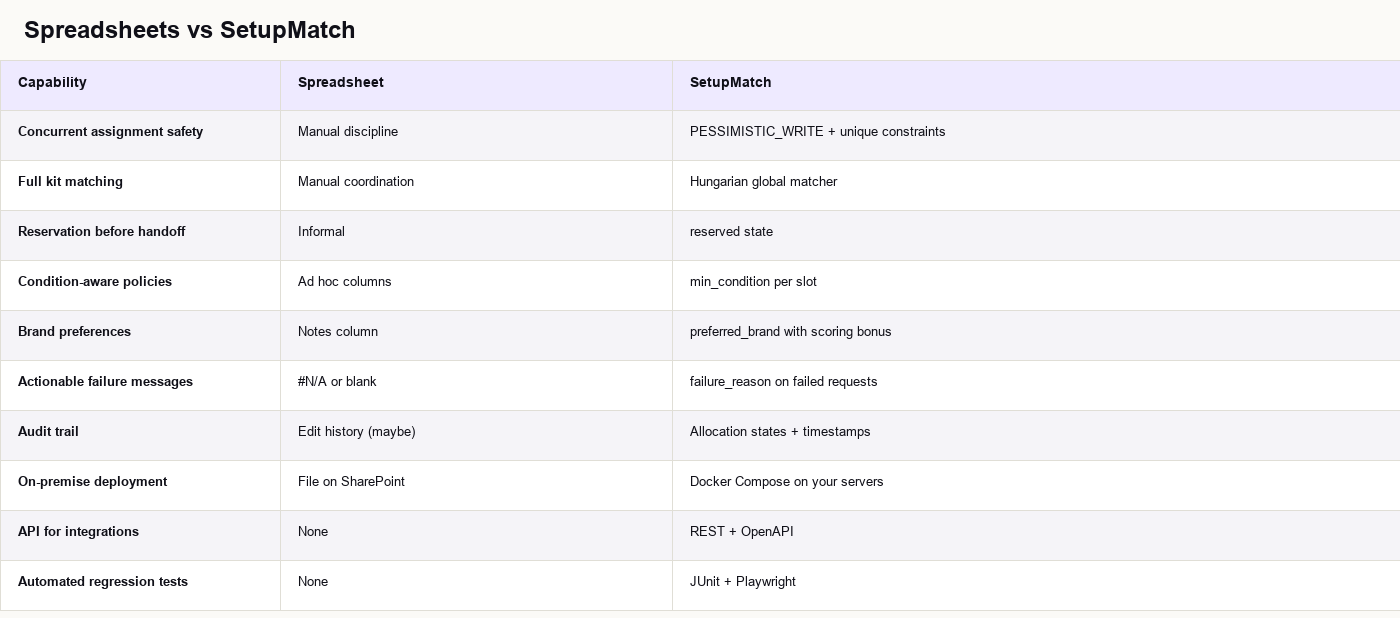
Spreadsheets vs a purpose-built allocator
Security, compliance, and data residency
SetupMatch v1 is a focused operator tool. Here is how the architecture supports enterprise constraints:
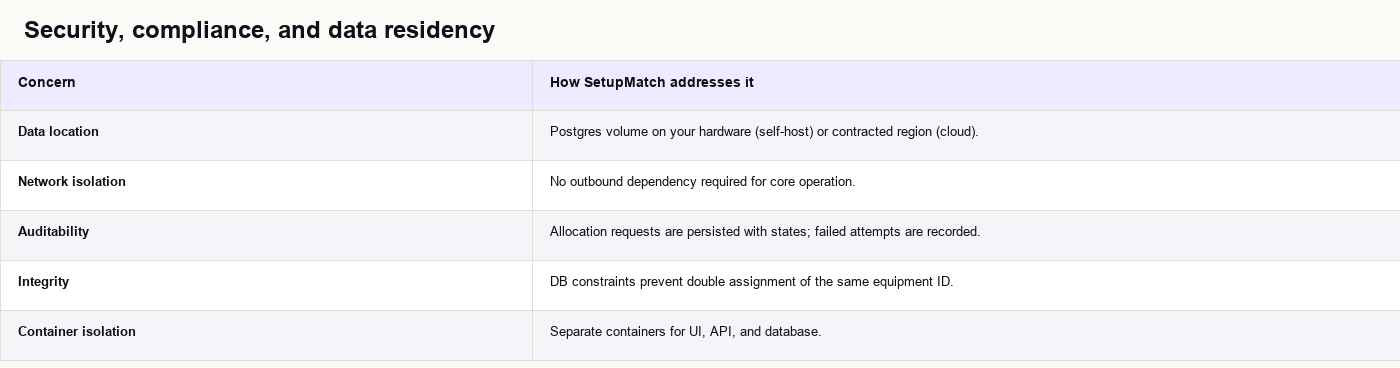
For GDPR and similar regimes, on-premise deployment means employee identifiers and asset records stay in your controlled environment. Pair with your existing backup, retention, and access policies.
Authentication and RBAC are roadmap items for multi-tenant enterprise deployments. Until then, place the stack on a management VLAN and protect it with your standard internal access controls.
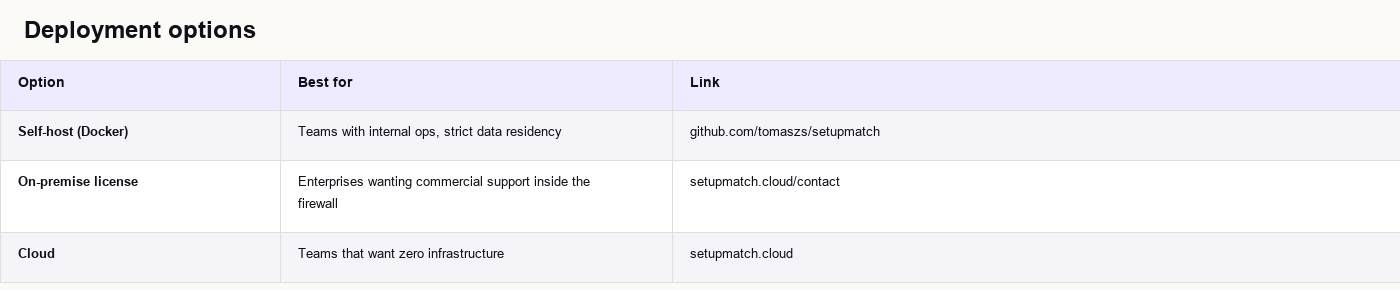
Deployment options for your organization
SetupMatch is open source with flexible deployment models:
Vendor evaluation checklist
When comparing device management systems, ask:
- Does matching optimize the whole kit or one line at a time?
- Is there an explicit reservation state before assignment?
- Can you run it on-premise with the same build your vendor tests in CI?
- How does the system behave when two operators allocate simultaneously?
- Are failed allocations explained or silently partial?
- Is there a REST API for HR/ITSM integration?
Getting started
Quick start (Docker)
Requires Docker Desktop or Docker Engine with Compose v2:
git clone https://github.com/tomaszs/setupmatch.git
cd setupmatch
docker compose up --build
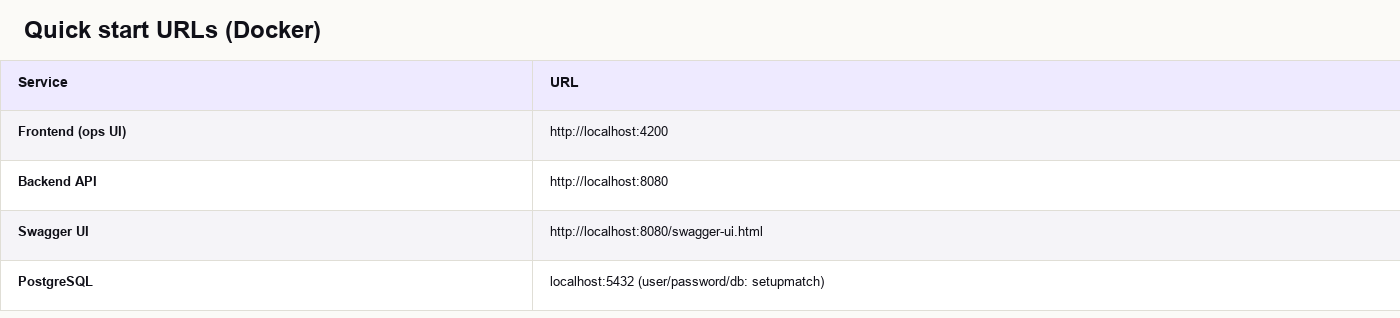
Seed data loads via Flyway (V2__seed.sql): 15 items across all equipment types.
Try an allocation
- Open http://localhost:4200/inventory and review seeded stock.
- Go to Allocations → New.
- Enter an employee ID and add policy slots (e.g. main computer + monitor).
- Submit. Review the matched kit on the detail page.
- Confirm to assign or Cancel to release back to inventory.
Run tests locally
Backend (with Docker test Postgres on port 5433):
docker compose -f docker-compose.test.yml up -d --wait
docker run --rm -v "${PWD}/backend:/app" -w /app
  -e SPRING_DATASOURCE_URL=jdbc:postgresql://host.docker.internal:5433/setupmatch
  -e SPRING_DATASOURCE_USERNAME=setupmatch -e SPRING_DATASOURCE_PASSWORD=setupmatch
  eclipse-temurin:21-jdk-alpine ./gradlew test --no-daemon
E2E (full stack):
docker compose up -d --wait
cd e2e
npm ci
npx playwright install chromium
npm test
Pilot roadmap for IT leaders
- Week 1: Deploy Docker stack on an internal VM. Import a subset of real inventory.
- Week 2: Define kit policies per role (engineering, design, support).
- Week 3: Run allocations for upcoming hires. Measure time vs spreadsheet baseline.
- Week 4: Decide hosting: stay self-hosted or move to SetupMatch Cloud.
FAQ for IT procurement teams
Is SetupMatch an ITAM replacement?
It focuses on allocation and inventory state for operational kit assignment. It is not a full ITAM suite with discovery agents, software licensing, or depreciation accounting in v1.
Can we integrate with ServiceNow or Jira?
The REST API is the integration point. Webhooks and native connectors are not in v1 but the API is stable and documented via OpenAPI.
How many devices can it handle?
The schema and indexes target thousands of rows. AllocationPerformanceIT exercises large synthetic datasets. For tens of thousands of units, run your own load test on representative hardware.
**Do we need Kubernetes?**
No. Docker Compose is sufficient for most on-premise pilots. Kubernetes is an optional scale-up path using the same container images.
**What license applies?**
The repository is proprietary open source. See LICENSE in the repo. Commercial on-premise licensing is available via **setupmatch.cloud/contact**.
**Where is the marketing site?**
**setupmatch.cloud** — product overview, contact, and resources. The app repo is github.com/tomaszs/setupmatch.
Summary
Device allocation is an **operations problem** disguised as an inventory problem. IT departments need:
- A truthful registry of what exists and where it is in the lifecycle.
- Policies that describe full kits, not single SKUs.
- Matching that respects hard constraints and optimizes soft preferences globally.
- Explicit reservation before handoff.
- Infrastructure that runs **on-premise behind your firewall** with one docker compose up`.
Visit setupmatch.cloud to explore features, compare cloud and on-premise options, or start a conversation with the team.
Further reading
- SetupMatch product site
- SetupMatch GitHub repository
- Contact / licensing
- SetupMatch marketing site repo
- Application README: architecture diagram, API summary, and test commands in the repo root
Assign the right equipment to every employee
SetupMatch helps IT teams track inventory, define kit policies, and match employees to the right hardware.
Get started